Ubiquiti UniFi nanoHD (AC Wave2 MU-MIMO): The Consensus
Disclosure: ORA Metrics may earn a commission on qualifying purchases made through the links in this report, at no extra cost to you.
The ORA Consensus Score
The Ubiquiti UniFi nanoHD is a compact and powerful wireless access point, widely praised for its high throughput and stable performance within a multi-AP Ubiquiti ecosystem. While its range can be limited for single-unit deployments, requiring a more thoughtful setup, it offers significant value for users comfortable with a prosumer networking environment.
How it stacks up
All Wireless Access Points (WAPs) rankings →Ranked #6 of 18 scored. Category leader: Cudy BE3600 (Wi-Fi 7 AP) at 8.7/10 — read that consensus →
Disclosure: ORA Metrics may earn a commission on qualifying purchases made through our links, at no extra cost to you.
Also available at Walmart (unaffiliated, price/availability not tracked)
Score Breakdown
High Performance in a Compact Form Factor
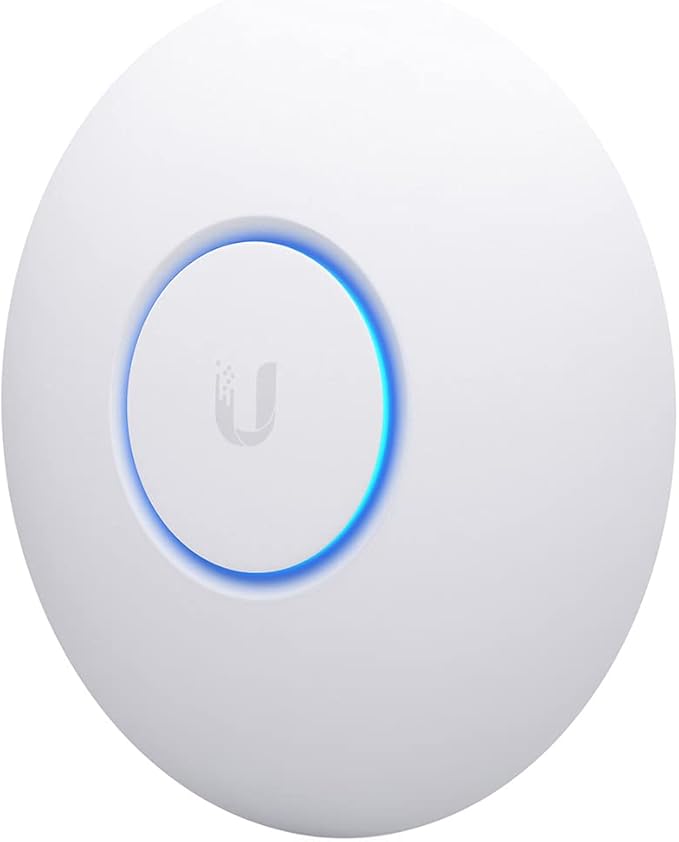
The Ubiquiti UniFi nanoHD (UAP-NANOHD-US) stands out as a compact and capable Wireless Access Point, frequently lauded by owners for its impressive throughput and speed. Many users reported a significant improvement in wireless speeds, with some experiencing up to 500-750 Mbps on 5GHz devices like MacBooks and iPhones, and a few achieving close to wired connection speeds. This performance is particularly appreciated in environments with multiple concurrent users, where its MU-MIMO and Wave 2 802.11ac capabilities shine. Several owners noted that even with numerous devices connected, including streaming cameras and smart home gadgets, the AP maintained strong performance. The small form factor and discreet design, often compared to a smoke detector, also received positive remarks, making it suitable for various installations, including ceiling mounts.
Navigating Coverage and Ecosystem Demands
Wireless coverage for the nanoHD elicited mixed feedback, with many owners emphasizing its design for high-density, smaller cell sizes rather than expansive long-range coverage. While some users found a single unit provided ample coverage for homes up to 2500-3000 sq ft, many others noted a decidedly local range, particularly on the 2.4GHz band, and stressed the need for multiple units to achieve whole-home or multi-level coverage. This characteristic, however, was also seen as beneficial by some for reducing interference in congested RF environments and improving device roaming. The UniFi ecosystem, while powerful and offering extensive control, comes with a learning curve. Numerous owners highlighted that the nanoHD is not a plug-and-play device, requiring the UniFi Controller software for full configuration and management. While many praised the controller's capabilities for network mapping, VLAN support, and detailed client monitoring, some expressed frustration with initial setup difficulties, the need for a technical background, and occasional issues with mobile app availability or outdated software dependencies like MongoDB.
Reliability, Connectivity, and Value
Once properly configured, the Ubiquiti UniFi nanoHD generally demonstrates strong reliability and endurance. Many owners described their units as "rock solid," reporting flawless operation for months or even years without reboots, often attributing this to regular firmware updates that resolved initial quirks. Seamless roaming between multiple nanoHDs was a frequently praised feature, contributing to a stable user experience. The convenience of Power over Ethernet (PoE) for installation was highly valued, simplifying wiring by allowing a single cable for both power and data. Despite some initial setup challenges and the potential need for multiple units, the nanoHD is widely considered an excellent value. Many owners felt it brought enterprise-grade features and performance within reach of prosumers, offering a superior experience compared to many consumer-grade routers at a comparable or even lower overall cost when building a comprehensive network.
The Good
- Delivers excellent throughput and speed, especially on the 5GHz band.
- Provides exceptional stability and reliability once configured within a UniFi network.
- Offers seamless roaming and efficient multi-user performance in high-density environments.
- Features a compact, discreet design and supports convenient Power over Ethernet (PoE) installation.
The Bad
- Has a shorter range than many consumer-grade APs, often necessitating multiple units for full coverage.
- Requires a technical background and the UniFi Controller software for comprehensive setup and management.
- Some users reported initial firmware instability or slow provisioning times, though many issues were resolved with updates.
- Concerns were raised by some about outdated software dependencies in the UniFi Controller.
What owners actually said
“Easy to set up, very strong signal, and overall a great piece of tech. A tad big when you are trying to plant it somewhere, but that’s a small price to pay for its performance.”
“It's great stuff for the home. I think they could do a better job with directions for the homeowner and it took a big to get it to attach to the network. The strength of this and the Dream Machine is a bit less than I expected, but the signal is solid which is more important.”
“Good product. Works seamlessly with good coverage. Will recommend strongly. Reasonable price for a product that is very useful.”
Quoted verbatim from the verified owner reviews this report was synthesized from.
Ubiquiti UniFi nanoHD (AC Wave2 MU-MIMO) · 7.9/10
For technically inclined users or those willing to invest in a multi-access point Ubiquiti network, the UniFi nanoHD offers enterprise-grade performance and robust management capabilities. While it demands a more involved setup and may require multiple units for extensive coverage, its speed, stability, and value make it a highly recommended choice for building a reliable wireless infrastructure.
Disclosure: ORA Metrics may earn a commission on qualifying purchases made through our links, at no extra cost to you.
Also available at Walmart (unaffiliated, price/availability not tracked)
Specifications
Manufacturer-published specs. Not part of the review analysis.
Features & Specs
| Other Special Features of the Product | Access Point Mode |
|---|---|
| Frequency Band Class | Dual-Band |
| Wireless Compability | 802.11ac |
| Compatible Devices | Desktop, Laptop |
| Connectivity Technology | Ethernet |
| Antenna Type | Internal |
| Operating System | Linux |
| Security Protocol | WPA, WPA2 |
| Number of Ports | 2 |
| Control Method | Touch |
| Data Transfer Rate | 1733 megabits_per_second |
| LAN Port Bandwidth | 100 Mbps |
| Voltage | 48 volts |
| Maximum Upstream Data Transfer Rate | 1733 megabits_per_second |
| Number of Antennas | 4 |
| Wi-Fi Generation | WiFi 5 |
| Connectivity Protocol | Wi-Fi |
| Controller Type | Switch |
| Coverage | Extensive |
| Frequency | 5 GHz |
Item details
| Brand | Ubiquiti Networks |
|---|---|
| Model Name | UniFi nanoHD |
| Built-In Media | Access Point, Ceiling/Wall Mount Kit |
| Model Number | UAP-NANOHD-US |
| UPC | 817882024228 |
| Global Trade Identification Number | 00817882024228 |
| Manufacturer | Ubiquiti |
| Item Type Name | Access Point |
| Mfr Part Number | UAP-AC-PRO-5-US |
Measurements
| Item Weight | 680 g |
|---|---|
| Item Dimensions L x W x H | 6.3"L x 6.3"W x 1.3"H |
Additional details
| Color | White |
|---|
Frequently Asked Questions
What are the key performance benefits of the Ubiquiti UniFi nanoHD?
The UniFi nanoHD delivers excellent throughput and speed, especially on the 5GHz band, with many users reporting speeds up to 500-750 Mbps. It also provides exceptional stability, reliability, and seamless roaming within a UniFi network, performing well in high-density environments.
Is the Ubiquiti UniFi nanoHD difficult to set up?
Yes, it is not a plug-and-play device and requires a technical background. Comprehensive setup and management depend on the UniFi Controller software, which has a learning curve.
How much wireless coverage does a single UniFi nanoHD provide?
The nanoHD is designed for high-density, smaller cell sizes, not expansive long-range coverage. Many users found its range to be local, often requiring multiple units for full home or multi-level coverage, especially on the 2.4GHz band.
Is the Ubiquiti UniFi nanoHD considered a good value?
Yes, despite the potential need for multiple units and initial setup challenges, the nanoHD is widely considered an excellent value. It offers enterprise-grade features and performance for prosumers at a comparable or lower overall cost than many consumer-grade alternatives when building a comprehensive network.
What are the physical design and installation advantages of the nanoHD?
It features a compact, discreet design, often compared to a smoke detector, making it suitable for various installations including ceiling mounts. It also supports convenient Power over Ethernet (PoE) installation, simplifying wiring with a single cable for power and data.