TP-Link ER706W Omada Router: The Consensus
Disclosure: ORA Metrics may earn a commission on qualifying purchases made through the links in this report, at no extra cost to you.
The ORA Consensus Score
The TP-Link ER706W Omada Router offers strong throughput and performance for its price, but owners report significant issues with reliability, limited features, and complex configurations for advanced networking tasks.
How it stacks up
All Gateways / Routers rankings →Ranked #20 of 24 scored. Category leader: Mikrotik CCR2004-1G-12S+2XS (High-Performance Ethernet Router) at 9.3/10 — read that consensus →
Disclosure: ORA Metrics may earn a commission on qualifying purchases made through our links, at no extra cost to you.
Also available at Best Buy, Walmart (unaffiliated, price/availability not tracked)
Score Breakdown
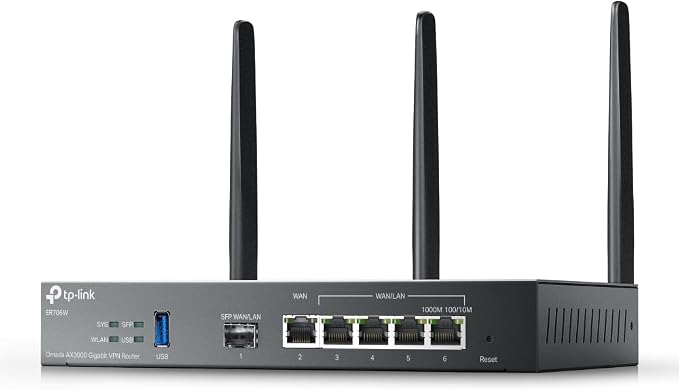
The TP-Link ER706W Omada Router, available in configurations such as the VPN Router+WiFi and minimalist options, presents a mixed experience for owners. Many commend its impressive throughput and performance, noting its ability to deliver full gigabit speeds through Ethernet and provide excellent WiFi range, even covering substantial areas like a 900 sq/ft basement. Users frequently highlight its capability to manage numerous devices, including a significant number of cameras and various network components, without experiencing slowdowns. The device is also praised for its effectiveness in setting up private networks over long distances and its fast roaming mesh capabilities when paired with Omada access points. The accompanying app is generally found to be user-friendly for basic management, and several owners consider the router to be a fair-priced, professional-grade unit for small offices or robust home labs.
However, the router faces considerable criticism regarding its reliability and endurance. A recurring complaint among owners is the device's tendency to crash frequently, leading to dropped wireless clients that cannot reconnect until the router is power-cycled. These stability issues persist even after firmware updates, with some users reporting multiple unit failures. Furthermore, the features and capabilities of the ER706W often fall short of expectations. A significant point of contention is the USB 3.0 port, which many buyers hoped to use for network-attached storage (NAS) or file sharing. Owners discovered that its functionality is largely restricted to unit backups, and this limitation becomes even more pronounced when the router is integrated into an Omada mesh network, where the USB port is primarily relegated to LTE backup with a dongle. This discrepancy has led to disappointment, with some feeling the product is not as advertised.
Connectivity and advanced configurations also present challenges. While the router supports VLANs, several owners found it difficult to configure inter-VLAN traffic rules in standalone mode, limiting its utility for granular network segmentation. The device's integration with the broader Omada ecosystem is another area of concern, as some users report that it does not join the cloud or offer the same level of remote management as other Omada SDN systems. There are also specific hardware limitations, with some buyers discovering that earlier versions (v.1.XX) do not support client VPN services like NordVPN, requiring specific hardware revisions. The setup process for advanced options can be complex and confusing, especially when integrating with an Omada Controller, leading some to prefer standalone mode for its simpler GUI.
Despite these drawbacks, the TP-Link ER706W is often seen as a solid device for its intended purpose, particularly for those who can navigate its configuration complexities or use it in standalone mode. Its strong performance metrics, ability to handle demanding network loads, and perceived value for money are frequently cited positives. However, the reported reliability issues, coupled with the restrictive nature of its USB port and advanced networking features, mean that potential buyers should carefully consider their specific needs and technical comfort level before committing to this router.
The Good
- Delivers excellent WiFi range and fast gigabit speeds through Ethernet
- Capable of handling a high volume of connected devices and cameras without performance degradation
- Effective for creating secure private networks and extends WiFi coverage with Omada access points
- Offers an intuitive app for basic management and is considered a good value for its professional-grade capabilities
The Bad
- Multiple reports of frequent crashes and dropped wireless client connections requiring power cycles
- USB port functionality is severely limited, primarily for backups and not network storage, especially in Omada mesh setups
- Advanced configurations, such as VLANs and remote management, are often complex, restrictive, or not fully supported in standalone mode
- Some owners experienced unit failures and noted a lack of full Omada cloud integration compared to other Omada devices
What owners actually said
“Was able to create a two way private network between long distances without an issue. Without this the issues were slow and did not work as all. They were really slow. Fantastic”
“Was hoping to use this vpn router with NordVPN only to find out v. 1.XX hardware does not! totally bummed out. Do not buy if expecting to use a Client VPN for your house.Will need to look for v.2 Hardware to do so.”
“The range covers my 900 sq/ft basement. Also let's 3 access points with no problem. Passes through full gigabit speeds through Ethernet. I really like the app to manage it as well.”
Quoted verbatim from the verified owner reviews this report was synthesized from.
TP-Link ER706W Omada Router · 6.0/10
While the TP-Link ER706W Omada Router provides robust speeds and coverage for its cost, potential buyers should be aware of its reported stability issues and feature limitations, particularly for those seeking advanced network storage or seamless Omada cloud integration.
Disclosure: ORA Metrics may earn a commission on qualifying purchases made through our links, at no extra cost to you.
Also available at Best Buy, Walmart (unaffiliated, price/availability not tracked)
Specifications
Manufacturer-published specs. Not part of the review analysis.
Features & Specs
| Other Special Features of the Product | Access Point Mode |
|---|---|
| Frequency Band Class | Dual-Band |
| Wireless Compability | 802.11ax |
| Compatible Devices | Personal Computer |
| Antenna Location | Business, Home |
| Connectivity Technology | Wi-Fi |
| Antenna Type | Fixed |
| Operating System | [Proprietary Routing OS] |
| Security Protocol | WPA2 |
| Number of Ports | 6 |
| Control Method | App |
| Data Transfer Rate | 2402 megabits_per_second |
| LAN Port Bandwidth | 5000 Mbps |
| Voltage | 12 volts_of_direct_current |
| Maximum Upstream Data Transfer Rate | 5000 megabits_per_second |
| RAM Memory Installed | 512 MB |
| Number of Antennas | 3 |
| Router Firewall Security Level | High |
| Router Network Type | mixed |
| Connectivity Protocol | WiFi 6, Ethernet |
| Coverage | Wide coverage, extendable with Omada Mesh |
| Frequency | 5 GHz |
Item details
| Brand | TP-Link |
|---|---|
| Model Name | ER706W |
| Built-In Media | DC Power Adapter, Detaqchable Antennas, ER706W, Installation Guide |
| Model Number | ER706W |
| UPC | 840030705250 |
| Manufacturer | TP-Link |
| Mfr Part Number | ER706W |
Additional details
| Color | black |
|---|
Frequently Asked Questions
How reliable is the TP-Link ER706W Omada Router?
Owners frequently report that the TP-Link ER706W Omada Router experiences crashes and dropped wireless client connections, often requiring power cycles to resolve. Some users also noted unit failures and stability issues persisting even after firmware updates.
Can the TP-Link ER706W Omada Router's USB port be used for network storage?
The USB 3.0 port on the ER706W Omada Router has severely limited functionality, primarily restricted to unit backups. It is not designed for network-attached storage or file sharing, and its use is further limited to LTE backup with a dongle in Omada mesh setups.
Is the TP-Link ER706W Omada Router good for advanced networking or Omada cloud integration?
Advanced configurations like VLANs and remote management can be complex, restrictive, or not fully supported in standalone mode. Some owners also found that the router does not offer full Omada cloud integration compared to other Omada SDN devices.
What are the performance strengths of the TP-Link ER706W Omada Router?
The router delivers excellent WiFi range and fast gigabit speeds through Ethernet, capable of handling a high volume of connected devices and cameras without performance degradation. It is also effective for creating secure private networks and extending WiFi coverage with Omada access points.
Who should consider buying the TP-Link ER706W Omada Router?
The TP-Link ER706W Omada Router is considered a good value for its professional-grade capabilities, robust speeds, and coverage, making it suitable for small offices or robust home labs. However, potential buyers should be prepared for reported stability issues, feature limitations, and complex advanced configurations.