GMKtec Mini PC G3 PRO (i3-10110U): The Consensus
Disclosure: ORA Metrics may earn a commission on qualifying purchases made through the links in this report, at no extra cost to you.
Re-analyzed Jul 2026 · score 7.8→7.7 · Warranty & Support recalibrated against all 10 GMKtec products we have analyzed
The ORA Consensus Score
The GMKtec Mini PC G3 PRO offers exceptional value and strong customer support, making it a highly portable and quiet solution for everyday computing tasks, though its performance for demanding applications and certain connectivity features are middling.
How it stacks up
All Mini PCs rankings →Ranked #8 of 31 scored. Category leader: GEEKOM A9 Max (Ryzen AI 9 HX 370) at 8.9/10 — read that consensus →
Disclosure: ORA Metrics may earn a commission on qualifying purchases made through our links, at no extra cost to you.
Also available at Walmart (unaffiliated, price/availability not tracked)
Available configurations
This consensus covers every size in the range: i3-10110U 16GB DDR4 + 512GB, R2514 16GB DDR4 + 512GB.
Owner reviews for this product pool across its configurations, so this report covers the family. Prices shown as captured; — means we haven't verified that configuration's price yet.
| Size | Price | |
|---|---|---|
| i3-10110U 16GB DDR4 + 512GB featured | — | Check price → |
| R2514 16GB DDR4 + 512GB | — | Check price → |
Score Breakdown
Exceptional Value and Support
The GMKtec Mini PC G3 PRO stands out for its exceptional value for money, with numerous owners describing it as an incredible bargain or one of their best purchases. Many found its price point, often around $120-$200, to be unbeatable for the performance and features offered. This sentiment is reinforced by its customer support, which is consistently lauded as exceptional. Multiple reviewers highlighted GMKtec's proactive outreach, quick responses, and effective resolution of issues, including sending replacements for faulty units, providing product keys, or assisting with diagnostics. This level of support, often described as unparalleled, significantly enhances the overall ownership experience, giving buyers confidence in their purchase.
Design and Everyday Performance
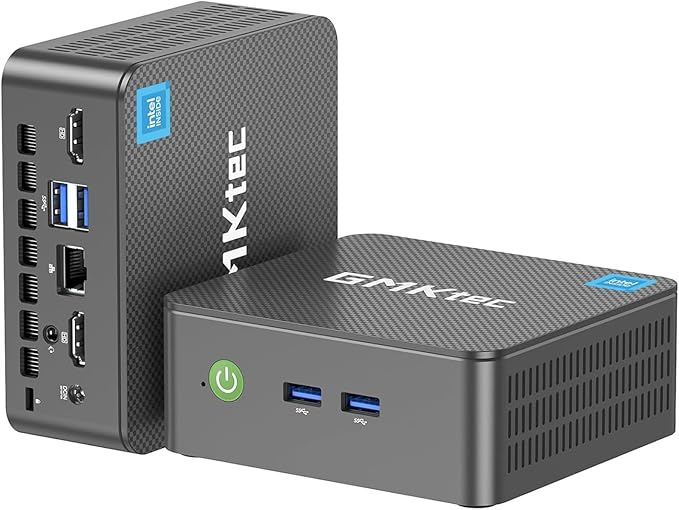
In terms of build and ergonomics, the G3 PRO receives excellent marks for its compact size, often fitting in the palm of a hand or behind a TV, making it ideal for space-constrained setups or as a travel PC. Owners appreciate its user-friendly internals, allowing for easy access to RAM and SSD for upgrades. The aesthetics and design are generally well-received, with some finding the "Lush Green" color unique and appealing, although a few found it less attractive. For cooling and noise, the device performs solidly, with many users praising its quiet operation, often describing it as "whisper quiet" or making "no peep." However, some owners noted that the fan can occasionally spin up noticeably under load, and a few expressed concerns about the SSD running hot or the overall heat management during prolonged, active use, sometimes suggesting external cooling or keeping the lid open.
Connectivity and Setup Nuances
Connectivity and ports receive a middling assessment. While the inclusion of dual HDMI ports and 2.5GbE Ethernet is appreciated by many, with several reporting impressive wired network speeds, the wireless connectivity and USB ports present some drawbacks. Multiple owners reported issues with inconsistent WiFi performance, attributing it to tiny internal antennas, and some experienced problems with Bluetooth connectivity, including devices not being recognized or experiencing range limitations. Additionally, a specific rear USB-A port was identified by one owner as being USB 2.0 despite appearing otherwise, leading to slower data transfers. Ease of setup and OS experience is solid, with many finding the initial Windows 11 Pro installation straightforward. However, a notable number of users encountered challenges, such as Windows activation issues, difficulty with driver installations during clean OS installs, or non-standard boot menu access, indicating that some technical expertise might be required for troubleshooting.
General Computing Power
The G3 PRO's general computing power, while sufficient for many, lands in the weak to middling range for more demanding tasks. Many users found the PC snappy and perfectly capable for basic tasks like web browsing, office applications, media streaming, and light programming. It's often described as a "little workhorse" for daily use. However, its limitations become apparent with more intensive workloads. Several owners reported that the PC struggles with 4K video playback, experiencing stuttering or high CPU usage. Gaming performance is generally limited to older or very basic titles, with some heavy or even mobile games causing slowdowns or freezes. Users performing tasks like heavy multitasking, running virtual machines, or using resource-intensive software like RDBMS servers or Visual Studio found the device to be underpowered, suggesting it's not ideal as a primary machine for power users. This indicates that while it excels at its core purpose of light computing, it's not designed for high-performance applications.
The Good
- Exceptional customer support, with proactive assistance and quick resolutions reported by many owners
- Outstanding value for money, frequently cited as a bargain for its capabilities
- Compact and portable design, with user-friendly internal access for upgrades
- Quiet operation, with many users appreciating its low noise output
The Bad
- Middling performance for intensive tasks like 4K video, heavy gaming, or complex software
- Connectivity issues reported, including inconsistent WiFi, Bluetooth problems, and a slower USB 2.0 port
- Setup challenges for some users, involving Windows activation, driver installation, or boot menu access
What owners actually said
“Super awesome value, easy setupNeed for remote network monitoring device at client’s site.Set auto-on with power failure in BIOS and runs without a monitor, keyboard, or mouse !Windows 11 Pro.Small and runs cool.Lightweight,”
“Good little dual monitor device. Only disappointment, my fault, no USBC outlets. I guess that is why it is so inexpensive. We like it 3days in.”
“Una buena marca, sin embargo, creo que me quedè corto con la memoria RAM pues a veces siento que era mejor algo mas”
Quoted verbatim from the verified owner reviews this report was synthesized from.
GMKtec Mini PC G3 PRO (i3-10110U) · 8.0/10
For users seeking an affordable, compact, and quiet mini PC for basic office work, web browsing, and media streaming, the GMKtec Mini PC G3 PRO is a compelling choice, especially given its highly praised customer service. However, those requiring robust performance for demanding applications or consistent wireless connectivity may need to consider alternatives or plan for upgrades.
Disclosure: ORA Metrics may earn a commission on qualifying purchases made through our links, at no extra cost to you.
Also available at Walmart (unaffiliated, price/availability not tracked)
Specifications
Manufacturer-published specs. Not part of the review analysis.
Additional details
| Operating System | 11 Pro |
|---|---|
| Specific Uses For Product | Business, Education, Everyday Use |
| Personal Computer Design Type | Mini PC |
| Color | Black |
| Additional Features | Office PC, Home Theater, Digital Signage, Video Conference, Business, Video & Photo Editing, Education, Everyday Use, Multimedia |
| Hard Disk Description | PCIe 3.0 M.2 2280 NVMe/ M.2 2242 SATA |
| Hardware Interface | 3.5mm Audio, 802.11 ac/b/g/n, Bluetooth 5, Ethernet, HDMI, PCI Express x16, USB 3.2 Gen 1 |
| Power Consumption | 15 watts |
| Video Output Interface | HDMI |
| Hard Disk Interface | PCIE x 16 |
| Style Name | i3-10110U |
| EU Spare Part Availability Duration | 1 years |
| Cooling Method | Air |
| Compatible Devices | Keyboard, Monitor, Mouse, Speaker, Television |
| Power Plug Type | Type A - 2 pin (North American) |
| Video Output | HDMI |
Memory
| Cache Memory Installed Size | 16 MB |
|---|---|
| Memory Storage Capacity | 64 GB |
| RAM Memory Installed | 16 GB |
| RAM Memory Technology | DDR4 |
| Ram Memory Maximum Size | 64 GB |
| Memory Speed | 2666 MHz |
| RAM Type | SODIMM |
| Memory Clock Speed | 2666 MHz |
Display
| Screen Size | 75 inches |
|---|---|
| Display Resolution Maximum | 3840x2160 pixels |
| Display Type | LED |
| Aspect Ratio | 16:9 |
| Resolution | 3840 x 2160 |
| Native Resolution | 3840 x 2160 |
Connectivity
| Connectivity Technology | Bluetooth, Ethernet, HDMI, LAN, USB |
|---|---|
| Wireless Compability | 2.4 GHz Radio Frequency, 5 GHz Radio Frequency, 802.11a/b/g/n/ac, Bluetooth |
| Wireless Technology | Bluetooth, Wi-Fi |
Item details
| Brand | GMKtec |
|---|---|
| Model Number | G3 PRO |
| Model Name | G3 PRO |
| Built-In Media | GMKtec Nucbox G3 PRO Mini PC Intel 16GB RAM 512GB Hard Drive, HDMI Cable, Power Supply & Cable, User Manual, VESA Mount with Screws |
| Processor Brand | Intel |
| Model Year | 2026 |
| CPU Model Number | Core i3 10110U Turbo Boost 4.1GHz |
| Video Processor | Intel |
| Global Trade Identification Number | 00199874257150 |
| Unit Count | 1 Count |
| Manufacturer | Shenzhenshi Jimokekejiyouxiangongsi |
Graphics
| Graphics Description | Integrated |
|---|---|
| Graphics Coprocessor | Intel Graphics 1000MHz |
| Graphics Card Ram | 16 GB |
| Graphics Ram Type | Shared |
| Graphics Card Interface | Integrated |
Processor
| Processor Series | Core i3-10110U |
|---|---|
| Processor Speed | 4.1 GHz |
| Processor Socket | FCBGA1264 |
| Processor Count | 4 |
| CPU Model Speed Maximum | 4.1 GHz |
Ports
| Total Usb Ports | 4 |
|---|---|
| Total Number of HDMI Ports | 2 |
| Number of Component Outputs | 2 |
Input Devices
| Human-Interface Input | Buttons, Keyboard, Mouse |
|---|---|
| Keyboard Description | Wired keyboard |
| Keyboard Layout | QWERTY |
Frequently Asked Questions
Is the GMKtec Mini PC G3 PRO suitable for demanding software or gaming?
The G3 PRO is ideal for basic tasks like web browsing, office work, and media streaming. However, it offers middling performance for intensive tasks such as 4K video playback, heavy gaming, or resource-intensive software, where it may struggle.
Does the GMKtec Mini PC G3 PRO have reliable wireless connectivity?
Some owners reported inconsistent WiFi performance, attributed to tiny internal antennas, and issues with Bluetooth connectivity, including devices not being recognized or experiencing range limitations. Wired 2.5GbE Ethernet, however, generally performs well.
How is the customer support and overall value of the GMKtec Mini PC G3 PRO?
The G3 PRO offers outstanding value for money, often described as a bargain. Its customer support is consistently lauded as exceptional, with proactive assistance, quick responses, and effective resolution of issues, significantly enhancing the ownership experience.
Is the GMKtec Mini PC G3 PRO quiet and easy to move?
Yes, many users praise its quiet operation, often describing it as whisper quiet. Its compact and portable design makes it ideal for space-constrained setups or as a travel PC, with user-friendly internal access for upgrades.
Are there any common challenges when setting up the GMKtec Mini PC G3 PRO?
While many find the initial Windows 11 Pro installation straightforward, some users encountered challenges like Windows activation issues, difficulty with driver installations during clean OS installs, or non-standard boot menu access, potentially requiring some technical expertise.