ASUS ROG Strix B850-I Gaming WiFi Motherboard (AM5 ITX): The Consensus
Disclosure: ORA Metrics may earn a commission on qualifying purchases made through the links in this report, at no extra cost to you.
The ORA Consensus Score
This ASUS ROG Strix B850-I Gaming WiFi motherboard offers a feature-rich AM5 Mini-ITX platform with strong upgrade potential, though owners report inconsistent reliability and connectivity issues.
How it stacks up
All Motherboards rankings →Ranked #20 of 20 scored. Category leader: MSI MAG B550 Tomahawk Gaming Motherboard at 8.8/10 — read that consensus →
Disclosure: ORA Metrics may earn a commission on qualifying purchases made through our links, at no extra cost to you.
Also available at Best Buy, Walmart (unaffiliated, price/availability not tracked)
Available configurations
This consensus covers every style in the range: Mini-ATX, ATX, mATX.
Owner reviews for this product pool across its configurations, so this report covers the family. Prices shown as captured; — means we haven't verified that configuration's price yet.
| Style | Size | Price | |
|---|---|---|---|
| Mini-ATX featured | B850-I | — | Check price → |
| ATX | B850-A | — | Check price → |
| ATX | B850-F | — | Check price → |
| mATX | B850-G | — | Check price → |
| ATX | B850-F Neo | — | Check price → |
Score Breakdown
A Compact Powerhouse with Noteworthy Quirks
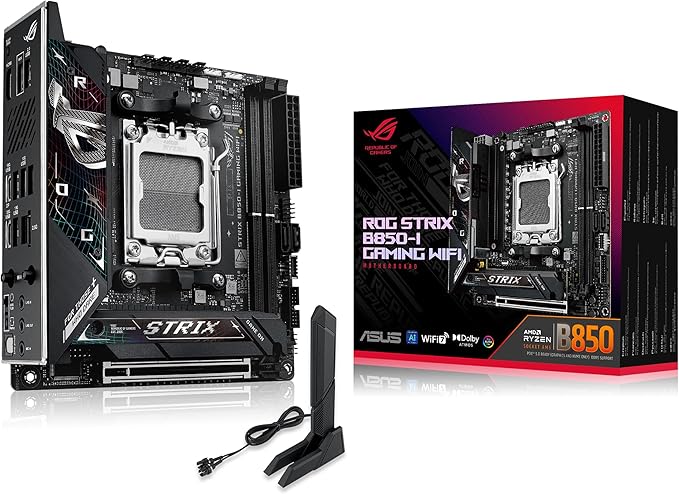
The ASUS ROG Strix B850-I Gaming WiFi motherboard, part of a family that includes Mini-ATX, ATX, and mATX configurations like the B850-A, B850-F, B850-G, and B850-F Neo, aims to deliver a premium AM5 platform in a compact form factor. Owners frequently highlight its excellent upgrade potential, praising its inclusion of bleeding-edge features such as PCIe 5.0 for both graphics cards and M.2 SSDs, alongside advanced connectivity like WiFi 7 and 2.5 Gigabit Ethernet. Many users building with Windows 11 found the setup straightforward, with the ASUS BIOS often described as user-friendly and stable, offering features like AI Overclocking, AI Networking II, and Advisor to simplify fine-tuning even for novices. The board’s robust power delivery, featuring 10+2+1 stages rated for 70A per stage and quality aluminum heatsinks for the VRMs, is consistently noted for supporting stable performance and strong overclocking potential even with demanding Ryzen 7000, 8000, or 9000 series CPUs. Its array of high-speed USB ports, including a 20 Gbps USB-C and multiple 10 Gbps ports, further enhances its appeal for feature-rich compact builds, making it a "premium mini-ITX marvel" for many.
Connectivity and Compatibility Challenges
Despite its impressive feature set, the ASUS ROG Strix B850-I faces significant owner complaints regarding connectivity and compatibility, resulting in a weak experience for many. A recurring issue is the inconsistent performance of the integrated WiFi and Bluetooth, often attributed to a Mediatek chipset, with reports of ping spikes, lag under load, and even instances of the WiFi/Bluetooth chip dying. Furthermore, ASUS’s proprietary "Q-Antenna" connector is a point of frustration, as it limits the use of standard third-party antennas for improved signal strength, forcing users to rely on the included shark fin antenna. Driver support, particularly for Windows 10, is another common pain point, with many users having to resort to workarounds like using a USB Ethernet adapter or finding unofficial patches to get essential network drivers installed. M.2 SSD installation also presents challenges; some owners report the heatsink bending their drives, while others found the pre-installed thermal pads to be too thin, slim, or unnecessary for single-sided SSDs. The rear M.2 slot’s proximity to the board can prevent proper heatsink installation, leading to higher drive temperatures. Additionally, some users reported issues with the board not recognizing certain M.2 SSDs as bootable devices, or not reading drives correctly on auto or Gen 5 settings, requiring manual adjustments or troubleshooting.
Inconsistent Stability and Value Considerations
The overall stability of the ASUS ROG Strix B850-I motherboard elicits mixed feedback. While many users report rock-solid performance, quick boot times (especially compared to some competitors), and zero issues over extended periods, a notable segment of owners encountered critical reliability problems. These include instances of the board failing to post, exhibiting DRAM indicator errors, power pin malfunctions, or even bricking after BIOS updates, sometimes outside the return window. Such experiences suggest an inconsistent quality control. The cooling design, while generally effective for VRMs, has specific drawbacks related to M.2 thermal solutions and, in some cases, owners noted that ASUS "forgot" to apply a thermal pad on the VRM mosfets, requiring user intervention for optimal heat dissipation. Compatibility with certain CPU coolers, like the Arctic Liquid Freezer III, was also noted as problematic due to interference with the NVMe heatsink. Audio performance, driven by a USB-based ALC4080 codec, also drew criticism for occasional distortion or clipping, with some users needing to disable front-panel jack routines or resort to external DACs. Positioned at a premium price point, many owners question its value for money, especially when factoring in the potential need for workarounds or additional components to address the reported WiFi, audio, or M.2 issues. While some found it a "steal" on sale, others felt it was overpriced given the annoyances and potential for coil whine, rivaling even higher-tier chipsets from other brands.
The Good
- Excellent feature set and future-proofing with PCIe 5.0 and WiFi 7.
- Robust power delivery and effective VRM cooling for stable performance.
- User-friendly BIOS and straightforward setup for many Windows 11 users.
- Compact design with ample high-speed USB ports and 2.5G Ethernet.
The Bad
- Driver compatibility issues, especially for Windows 10, and challenging initial setup.
- Inconsistent WiFi and Bluetooth performance, exacerbated by a proprietary antenna design.
- Significant reports of critical stability problems, including boot failures, component defects, and M.2 installation quirks.
What owners actually said
“Board works great and with no issues. Used it in my build in the NCase M2. People seem to have issues with windows 10, but I use windows 11 so that doesn’t matter to me.”
“The new Q-Slot is damaging PCI-E cards, my brand new 5080 got damaged because of this board. Do not buy.”
“This board can't recognize the Samsung 990 Pro as a bootable device, despite recognizing it as a storage device. Tried every solution I can find on the internet (disabling csm, set speed to Gen4, updated to latest motherboard firmware/bios). Nothing worked.”
Quoted verbatim from the verified owner reviews this report was synthesized from.
ASUS ROG Strix B850-I Gaming WiFi Motherboard (AM5 ITX) · 5.1/10
The ASUS ROG Strix B850-I Gaming WiFi motherboard is a compelling choice for compact, high-performance AM5 builds seeking bleeding-edge features. However, potential buyers should be prepared for possible driver workarounds, M.2 installation quirks, and the risk of connectivity or stability issues.
Disclosure: ORA Metrics may earn a commission on qualifying purchases made through our links, at no extra cost to you.
Also available at Best Buy, Walmart (unaffiliated, price/availability not tracked)
Specifications
Manufacturer-published specs. Not part of the review analysis.
Features & Specs
| Processor Socket | Socket AM5 |
|---|---|
| Compatible Devices | Personal Computer |
| RAM Memory Technology | DDR5 |
| Compatible Processors | AM5 |
| Chipset Type | AMD B850 |
| Memory Clock Speed | 3200 MHz |
| Platform | Windows |
| CPU Model | Core i3 Family |
| Memory Storage Capacity | 96 GB |
| Ram Memory Maximum Size | 96 GB |
| Main Power Connector Type | 24-Pin |
| Graphics Card Interface | PCI Express 4.0 |
| Memory Slots Available | 1 |
| Number of Ports | 19 |
| Total SATA Ports | 2 |
| USB 2.0 | 1 |
| Total Usb Ports | 13 |
| Number of Ethernet Ports | 1 |
| Total Number of HDMI Ports | 1 |
| Total PCIe Ports | 2 |
| Chipset Family | AMD |
Item details
| Brand | ASUS |
|---|---|
| Model Name | 5Z8N |
| Model Number | 5Z8N |
| Manufacturer | ASUSTeK COMPUTER INC. |
| UPC | 197105823624 |
| Mfr Part Number | ROG STRIX B850-I GAMING WIFI |
| Unit Count | 1 Count |
| Item Weight | 1061 g |
| Built-In Media | ASUS Vivobook Laptop |
Additional details
| Item Dimensions L x W x H | 9"L x 3.8"W x 7.3"H |
|---|
Frequently Asked Questions
Which ASUS ROG Strix B850 motherboard configuration is best for my build?
The report covers a family including Mini-ATX, ATX, and mATX configurations (B850-I, B850-A, B850-F, B850-G, B850-F Neo). The B850-I is highlighted for compact, high-performance AM5 builds seeking bleeding-edge features like PCIe 5.0 and WiFi 7, despite potential quirks.
What are the main strengths of the ASUS ROG Strix B850 motherboard family?
These motherboards offer an excellent feature set with future-proofing (PCIe 5.0, WiFi 7), robust power delivery, and effective VRM cooling for stable performance. Many users also found the BIOS user-friendly, and the compact designs include ample high-speed USB ports and 2.5G Ethernet.
What are the biggest concerns or weaknesses reported by owners?
Owners frequently report driver compatibility issues, especially with Windows 10, and inconsistent WiFi and Bluetooth performance due to a proprietary antenna design. There are also significant reports of critical stability problems, including boot failures, component defects, and M.2 installation quirks.
Are there any specific issues with M.2 SSD installation or performance?
Yes, some owners report M.2 heatsinks bending drives or pre-installed thermal pads being too thin. The rear M.2 slot's proximity can prevent proper heatsink installation, and some users experienced issues with the board not recognizing M.2 SSDs as bootable or reading drives correctly on auto settings.
How reliable is the WiFi and Bluetooth connectivity on these motherboards?
Many owners report inconsistent WiFi and Bluetooth performance, with issues like ping spikes, lag, and even chip failures, often attributed to the Mediatek chipset. The proprietary 'Q-Antenna' connector also limits the use of standard third-party antennas for improved signal.